Bulk-Convert Lotus 1-2-3 Files
Turn .123, .wk1, .wk3, .wk4 and .wks workbooks into XLSX, CSV, PDF or SQLite on your own PC — multi-sheet workbooks, formulas and named ranges preserved, nothing uploaded.
- Converts locally — spreadsheets never leave your PC
- Whole folder trees to 7 formats in one pass
- One-time from $39.95 — no subscription
Windows 10/11 · No account · 10 files free
Windows 10/11 app — we'll email you the link for your PC
- 100% local — nothing uploaded
- No Lotus or SmartSuite license needed
- Secure Stripe checkout
- Full-feature trial · 10 files
Why not a free cloud converter?
Don't Risk Legacy Spreadsheet Data with Free Cloud Converters
Lotus archives often contain payroll, pricing, client ledgers, forecasts, and regulated operational records.
The Risk
Cloud converters may retain confidential spreadsheets or process them outside your approved data boundaries.
The Scale Problem
Opening files one at a time does not work for departmental archives or acquisition data rooms.
The Format Gap
Old .123, .wk1, .wk3, .wk4, and .wks files need modern outputs before teams can search, analyze, or preserve them.
The answer
Converts on your PC. Nothing is uploaded.
- Workbooks stay behind your firewall
- Batch whole folder trees recursively
- Every tab of multi-sheet .wk4/.123 workbooks kept in XLSX
- Formulas and named ranges translated where the source allows
Fidelity varies with very old or complex workbooks — test with 10 free files first.
How it works
- 1
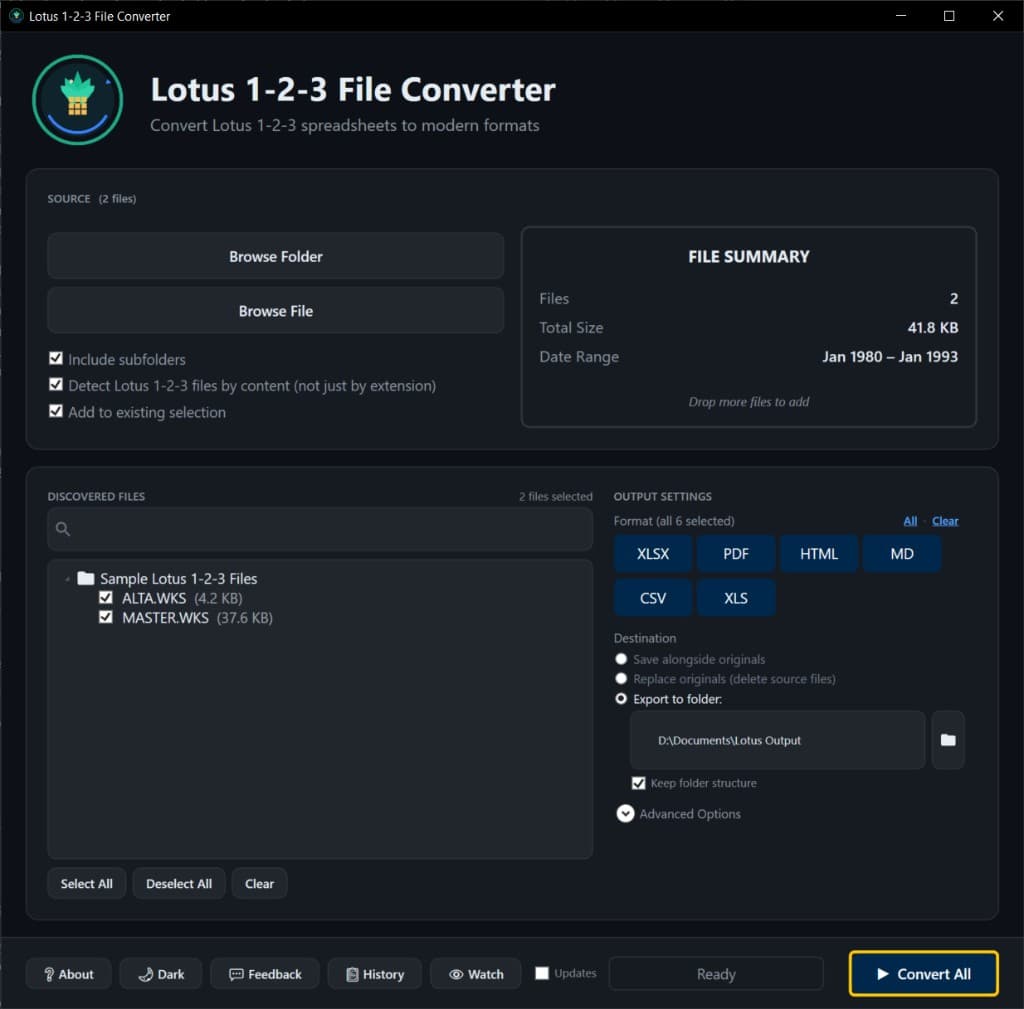
Add files or folders
Point it at a single file or a whole folder tree — subfolders are scanned recursively.
- 2
Tick your outputs
XLSX, PDF, HTML, Markdown, CSV, XLS or SQLite — several in one pass, optionally mirroring your folder structure.
- 3
Convert — then search it all
Click Convert. Need to find things later? Conversion Library Plus indexes what you converted.
What Matters for Lotus Migration
Standalone conversion with workbook fidelity — then Explorer shortcuts and bulk archive throughput
Standalone
No Lotus 1-2-3 Needed
Don't hunt down a 25-year-old Lotus or SmartSuite license just to open old workbooks. Lotus Converter is fully standalone — no IBM/Lotus software, no Excel add-ins, no third-party runtimes. Install and convert.
Fidelity
Multi-Sheet & Formula Fidelity
Purpose-built for Lotus 1-2-3. We preserve every tab in a multi-sheet .wk4 or .123 workbook in the XLSX output, keep number formats intact, and translate cells, formulas, and named ranges where the source data allows.
Workflow
Explorer & Watch Folders
Right-click a Lotus file or folder in Windows Explorer for a focused quick-convert, or point a watch folder at a migration drop zone so new .wk1, .wk3, .wk4, or .123 files convert automatically as they land.
Bulk
True Bulk Automation
Point Lotus Converter at entire folder trees and recursively convert thousands of legacy workbooks. Tick multiple outputs in one pass, and optionally mirror your archive's folder hierarchy in the converted output.
Supported formats
Convert common Lotus 1-2-3 and Symphony-era spreadsheet files into modern formats for review, archive, analytics, and AI preparation.
Inputs
.123, .wk1, .wk3, .wk4, .wks
Outputs
XLSX, PDF, HTML, Markdown, CSV, XLS, SQLite
You converted the spreadsheets. Now search them.
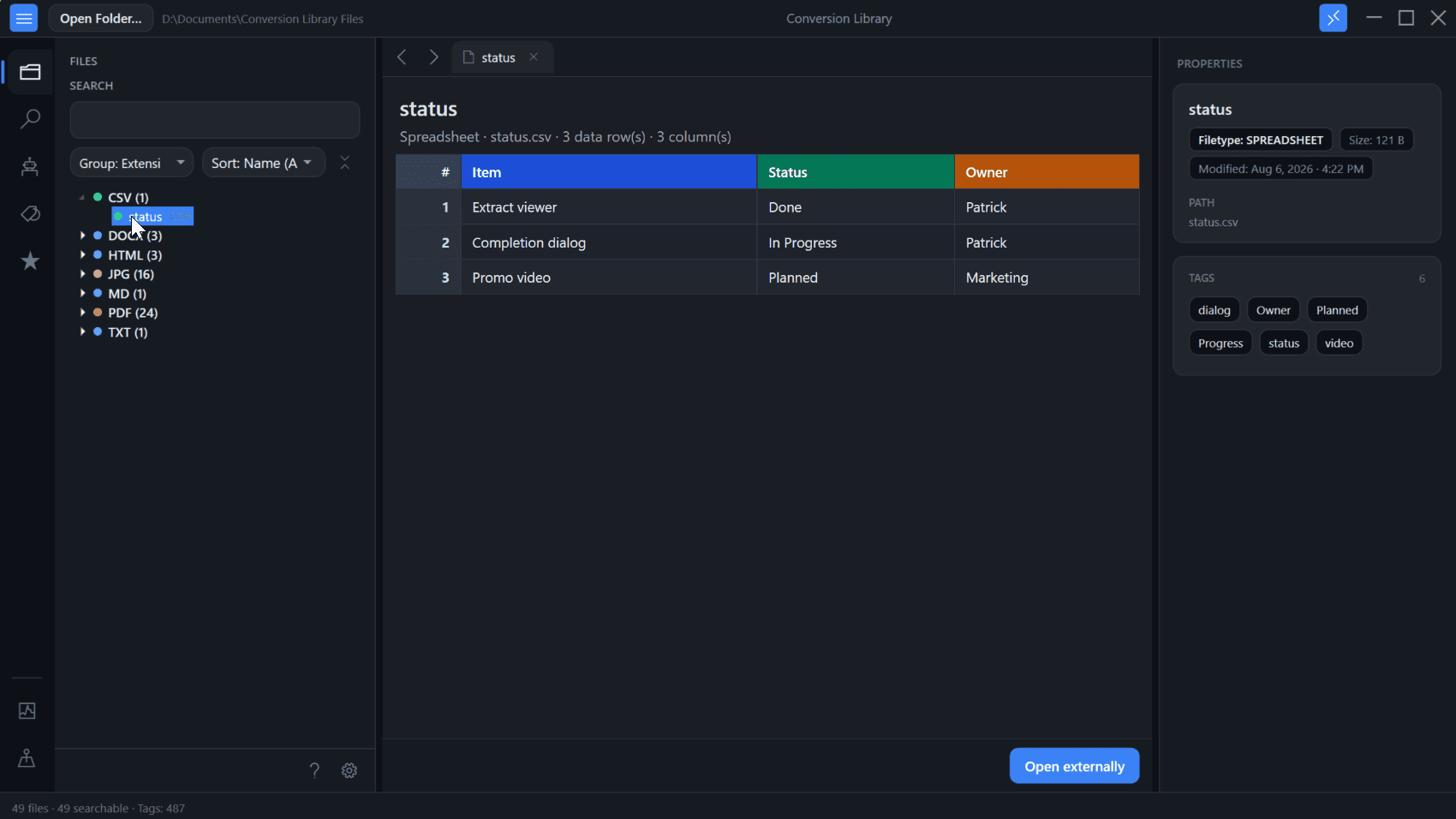
Standard converts Lotus 1-2-3 workbooks locally on this PC. Plus unlocks Conversion Library — a private library of the spreadsheets you converted. Search cells, tags, knowledge maps, and workbook previews. Same installer. Unlock with a Plus key. Nothing is uploaded.
- Full-text search across converted XLSX, PDF, CSV, HTML, and Markdown on this PC
- Tags and knowledge maps for related Lotus workbooks
- Built-in previews — Excel, PDF, and more
Plus add-on $29.95 if you already have Standard. Standard + Plus from the start is $69.90.
Simple, Transparent Pricing
One-time purchase. No subscriptions. No hidden fees.
Start with the full-feature trial — convert up to 10 Lotus files, then choose personal or commercial.
Standard
one-time · keep the app forever on 6.x
- Unlimited Lotus conversions
- All 7 output formats (XLSX, PDF, HTML, Markdown, CSV, XLS, SQLite)
- Free updates for all of version 6
- Bulk & folder processing
- Runs locally — nothing uploaded
Will you need to search these spreadsheets later?
Buy Standard — $39.95Already have Standard? Add Plus ($29.95)
More than Lotus files?
Legacy File Converter · from $79.95
For WordPerfect, Quattro Pro, images, and 100+ legacy formats — fully offline, from the same team.
FAQ
Do I need Lotus 1-2-3 installed?
No. The converter is a standalone Windows desktop application and does not require the original Lotus software.
Do my spreadsheets leave my computer?
No. Conversion happens locally on your Windows computer. Files are not uploaded to our servers.
Is there a free trial?
Yes. The free trial converts up to 10 files with full features — no signup and no watermarks. A one-time $39.95 Standard license unlocks unlimited conversions.
What is Conversion Library Plus?
Standard converts Lotus 1-2-3 spreadsheets locally on your PC. Plus unlocks Conversion Library — search, tags, knowledge maps, and spreadsheet previews of the workbooks you converted. Same installer; unlock with a Plus key ($29.95 add-on, or $69.90 for Standard + Plus). Nothing is uploaded. Learn more about Conversion Library.
Is it a subscription?
No. It is a one-time purchase with free updates for all of version 6.
What does commercial use cost?
Commercial Standard is $500 per seat and Commercial Plus is $750 per seat, one-time. Need more than one seat? Contact us.
Can I use it on my phone or Mac?
No — it is a Windows 10/11 desktop app. On a phone, we'll email you the download link for your PC.
Ready to convert your Lotus archive?
Try it free on your own files, then pay once.
Windows 10/11 · No subscription